
AI Calculator—Facade and Insulation Calculator
How does it work?
From the house description to an insulation quote with materials
Describe the job
House floor area or wall m², insulation material, thickness and render. From the description, AI sets the job type and these parameters.
Check the items
Insulation, ETICS system, render, scaffolding and extras with quantities. The “On-site measurement and estimate” item at a price of 0, travel per km.
Send the estimate
Labor and materials separately, a PDF estimate for the client.
What the work looks like in the app
Real screens from a sample apartment estimate, with made-up client details.
The app is in Polish today, so the screens below are Polish. An English version is in preparation.
You describe the job, AI sets up the project
Write what needs doing or add a photo of the floor plan. AI sets the floor area, the number of rooms and the scope of work, and you see the estimate amounts straight away.
- Every parameter AI set is marked
- Click it and correct it before the estimate goes to the client

Labor with working time
Each labor category has an amount and a number of crew working days, and you decide whether the client sees the time. Next to it you see the materials and labor summary. Items you repeat can be saved in your own library (in PRO for companies) and added to your next project.

You decide what the client sees
Choose what goes into the estimate and which details to show: items, completion time, price notes. The PDF goes out with your company's details.


Sharing and export
Access for a chosen person: read, edit or admin. The public read-only link is in PRO for companies. Export to PDF and XLS, and a company account can also upload its own price list from an .xlsx file.


Your company page in the directory
Build your company page from ready sections: about, location, services, projects and reviews.

On site from your phone
It is the same app: the project, the list of jobs and item details without a laptop.


What the calculator gives a facade company
Insulation, render and scaffolding in one quote per m² of wall.
Walls from the house floor area
When the client gives only the usable floor area, walls are 1.2 × the house floor area. Wall m² given without windows take precedence.
Insulation and render
White EPS, graphite EPS or mineral wool; 15 cm included in the system price, each extra centimeter as a material surcharge. Acrylic, silicate-silicone or silicone render. You prepare a variant with EPS and one with mineral wool with “Duplicate project”: in the copy you change the insulation. A copy uses points, with a PRO Subscription too, taken only once the copy succeeds.
Job type
Insulation with render, new render without insulation, facade painting, the ceiling only, PUR spray foam or facade washing. With the ceiling only or the foam only, walls are zeroed, even when the description gives the house floor area.
Scaffolding per m²
Scaffolding charged per m² of facade. When the client has their own or you work without scaffolding, the item disappears.
Client’s own material
When the client buys the materials themselves, labor remains—the ETICS system, render, paint and sill material disappear from the quote.
Plinth, sills, reveals, ceiling
A plinth with XPS and mosaic render, exterior sills per lin. m, window reveal insulation per lin. m when the walls are insulated and rendered and the description gives their length, and blown-in ceiling insulation as separate items.
PUR spray foam per m²
Open-cell foam for the attic or closed-cell foam for foundations and walls, with materials and installation per m². Without a thickness in the description, the template works out 20 cm of open-cell and 10 cm of closed-cell foam; each cm beyond that has a surcharge per m².
Facade washing
Pressure washing, with algae and fungus removal or chemical, per m² of wall. Water-repellent sealing after washing per m². Instead of scaffolding per m², a cherry picker counted in days.
Sample jobs
Typical jobs and how the calculator sets them up. You set your own prices.
House, 100 m² of walls, 15 cm EPS and acrylic render
The client gives the wall m² and the material. The template counts insulation, the ETICS system with EPS and acrylic render, and adds scaffolding separately per m².
Single-story house, 140 m² of walls, client’s material, no scaffolding
“I have my own material, no scaffolding needed”—the template keeps only the insulation labor, without materials and scaffolding.
Facade painting, approx. 200 m² of walls
The template counts two-coat painting, paint with primer and scaffolding, without insulation and render.
120 m² attic, 25 cm open-cell foam
Job type “PUR spray foam”: 120 m² of open-cell foam with a surcharge for 5 cm beyond 20 cm, with materials and installation.
40 m² foundations, 10 cm closed-cell foam
40 m² of closed-cell foam on the foundation walls, with materials and installation.
Washing a 180 m² facade with algae, sealing, a cherry picker for 2 days
Job type “facade washing and sealing”: washing with algae and fungus removal, water-repellent sealing per m² and a cherry picker per day, no scaffolding.
Try it on your own project
Describe the job or add a photo of the floor plan. Your first AI analysis costs nothing, and you see the full estimate in PRO.
Works with the other tools
Data moves with one click. Each tool also works on its own, and nothing is saved without your say-so.
Contract and estimate with the project data
Open the document generator from the project menu. Client, address, scope and amounts are already in. Send the contract to the client to sign online, and after the job prepare an acceptance report, plus an addendum when the scope changes.
Open

Acceptance report after the job
Below the contract in the generator, choose a work acceptance report or a contract addendum. The parties, address and contract date carry over on their own, and the client signs the report on the screen.

- Chrome extension
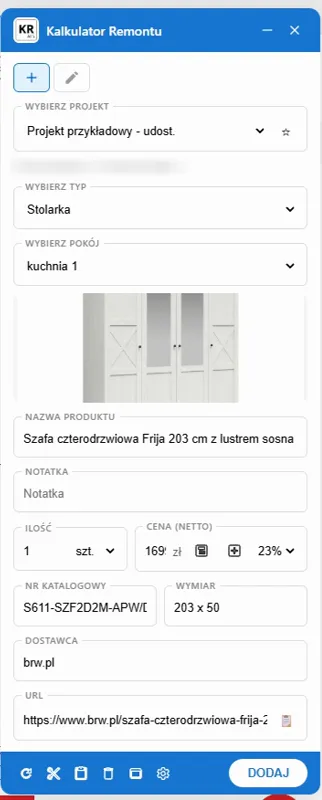
A product from a shop straight into the estimate
The Chrome extension takes what the shop gives—usually the name, photo and price—from the shop page into the project and room you choose. Whatever the shop does not give, you select on the page and say what it is—a name, a price, a dimension, a color, a finish, a material, a catalog number, the manufacturer or the supplier. In October 2026 we checked it on 24 Polish online shops; it is not limited to selected partners.
Open - Document generator

A QR code on the contract from the generator
The PDF ends with a QR code. Your client checks with a phone that the PDF file is the same document as the printout.
Open - Document generator
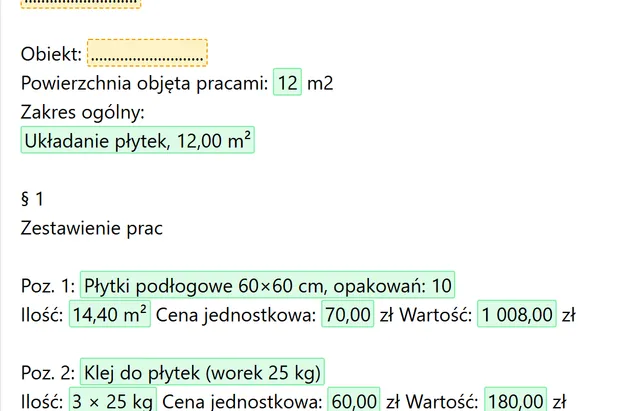
From a free calculator to an estimate
One click turns the paint or tiles calculator result into an estimate in the document generator.
Open


In preparation
Not there yet. This is how it is meant to look, so you know where this is going.
- Visualization—in preparation
Price updates through the Chrome extension
Refresh the price of a product added from a shop right from the project.
- Visualization—in preparation
Large estimates in the generator
All your pricing, with every item, will go into the estimate, not just the category totals.
Five tools, one renovation
Each one works on its own. Together they pass data along so you never retype it.
Room planner
Floor plan with room areas, 3D view
Chrome extension
Products from shop pages: what the shop gives
Renovation Calculator AI
Labor and materials priced from the client's description
Document generator
Contract, estimate, online signature, QR code
Free calculators
Paint, tiles, wall colors
- Chrome extension : Renovation Calculator AIa shop product goes into the projectWorks today
- Renovation Calculator AI : Document generatorcontract and estimate with project dataWorks today
- Free calculators : Document generatorpaint or tiles result as an estimateWorks today
- Renovation Calculator AI : Room planneropen the planner from the project menuWorks today
- Room planner : Renovation Calculator AIrooms with floor area and perimeterWorks today
- Room planner : Renovation Calculator AIinstallations from the plan into the estimateIn preparation
- Renovation Calculator AI : Chrome extensionproduct price refreshIn preparation
The full estimate
Every category and amount, with no hidden items.
Estimate settings
Scope of the estimate, details the client sees, and the PDF template.
Project sharing
Access for a chosen person: read, edit or admin. The public read-only link is for companies.
Duplicate projects
Copy a project and choose what comes along: quantities, photos, notes.
Margin, discount and VATfor companies
Set separately for furnishings, materials and labor—or on a single item when you want an exception.
Your own formulasfor companies
Change how an item is calculated, e.g. the amount of material per meter.
Company page in the directoryfor companies
Your company profile in this site's company directory, with projects and reviews.
Questions about quoting facades
How is PUR spray foam insulation worked out?
Per m², by foam type: open-cell (attic) or closed-cell (foundations, walls), with materials and installation. A thickness beyond 20 cm of open-cell and beyond 10 cm of closed-cell foam has a surcharge for each cm.
Is the washing product included?
Yes. The biocide and chemicals are in the washing rate per m². The sealant after washing is in the sealing rate too.
What VAT does facade washing have?
The template uses 8%. Facade washing on its own is a cleaning service, usually 23%; sealing as part of renovating a residential building is usually 8%. The contractor sets the rate, best with an accountant, and changes it in the project.
Join Our User Community
Have questions? Join our community of renovation calculator users and share your experiences.
