
AI Calculator—Post-Renovation and Post-Construction Cleaning Calculator
How does it work?
From a cleaning description to a PDF estimate
Describe the job
An apartment after renovation or a house after construction: the floor area, windows, film on the frames, panes with paint, adhesive residue, the kitchen, the site around the house. From the description, AI fills in the cleaning type and the quantities.
Check the items
Cleaning per m² of floor, windows and panes per unit, film per lin. m, adhesive and mortar on walls and the site after construction per m², cabinet interiors per kitchen and bulk bag removal per unit.
Send the quote
Cleaning, windows and detail cleaning, and removal in separate categories, travel per km and the “Inspection and on-site estimate” item priced at 0. A PDF estimate for the client.
What the work looks like in the app
Real screens from a sample apartment estimate, with made-up client details.
The app is in Polish today, so the screens below are Polish. An English version is in preparation.
You describe the job, AI sets up the project
Enter what needs cleaning: the size of the apartment or house, the number of windows, meters of film on the frames, the site after construction. AI sets the cleaning type and the quantities, and you see the amounts straight away.
- Every parameter AI set is marked
- Click it and correct it before the estimate goes to the client

Labor with working time
Each item is a rate with cleaning agents, and each category has an amount and the number of crew workdays. You decide whether the client sees the time. Cleaning, windows and detail cleaning, and removal are in separate categories. Items you repeat can be saved in your own library (in PRO for companies) and added to your next project.

You decide what the client sees
Choose what goes into the estimate and which details to show: items, completion time, price notes. The PDF goes out with your company's details.


Sharing and export
Access for a chosen person: read, edit or admin. The public read-only link is in PRO for companies. Export to PDF and XLS, and a company account can also upload its own price list from an .xlsx file.


Your company page in the directory
Build your company page from ready sections: about, location, services, projects and reviews.

On site from your phone
It is the same app: the project, the list of jobs and item details without a laptop.


What the calculator gives a post-renovation cleaning company
Net starting prices and 23% VAT, since cleaning is not construction work and has no reduced rate, in a private apartment too; you change the rate and every price.
An apartment after renovation or a house after construction
Per m² of floor: industrial vacuuming, washing floors, the bathroom, doors, radiators and outlets. With no type in the description, the template uses an apartment after renovation. Windows and cabinet interiors are separate.
Windows after renovation per unit
Washing a window with its frame and sill; a balcony door counts as one. Panes with paint, plaster or mortar to scrape off are a separate item per unit.
Film, adhesive and mortar
Removing protective film from window and door frames per lin. m, and adhesive and mortar residue from walls or tiles per m².
The kitchen and the site after construction
Washing kitchen cabinet interiors after installation per kitchen, and cleaning the site around the house after construction per m²: leftover materials, film and small debris.
Bulk bag removal
Bags, boxes and leftovers from the renovation in a bulk bag (approx. 1 m³) with pickup, per unit.
Site visit and travel
Every project has the item “On-site visit and quote” at 0 and travel per km. You set a rush job or weekend work with the project markup.
Sample jobs
Typical jobs and how the calculator sets them up. You set your own prices.
50 m² apartment after renovation
The template works out cleaning an apartment after renovation for 50 m² of floor.
55 m² apartment, 5 windows and a kitchen
The template works out cleaning for 55 m², washing 5 windows and the kitchen cabinet interiors.
140 m² house after construction with windows and the site
12 windows, 60 lin. m of film on the frames and 200 m² of site: the template works out the house after construction per m², windows per unit, film per lin. m and the site per m².
8 windows after painting, film and panes to scrape
The template works out washing 8 windows, 40 lin. m of film and 4 panes with paint to scrape off.
Bathroom: adhesive on the tiles and two bulk bags
The template works out removing adhesive residue from 20 m² of tiles and removing 2 bulk bags.
Try it on your own project
Describe the job or add a photo of the floor plan. Your first AI analysis costs nothing, and you see the full estimate in PRO.
Works with the other tools
Data moves with one click. Each tool also works on its own, and nothing is saved without your say-so.
Contract and estimate with the project data
Open the document generator from the project menu. Client, address, scope and amounts are already in. Send the contract to the client to sign online, and after the job prepare an acceptance report, plus an addendum when the scope changes.
Open

Acceptance report after the job
Below the contract in the generator, choose a work acceptance report or a contract addendum. The parties, address and contract date carry over on their own, and the client signs the report on the screen.

- Chrome extension
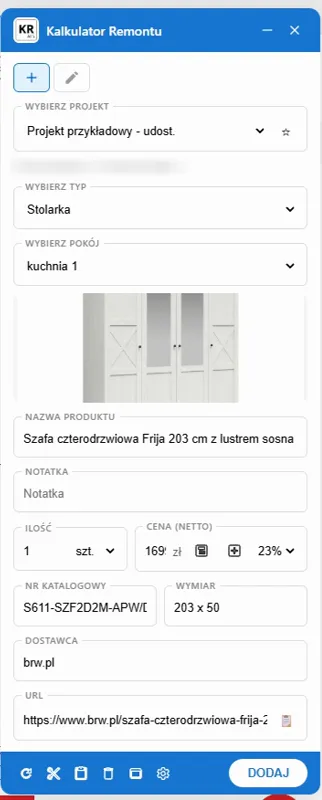
A product from a shop straight into the estimate
The Chrome extension takes what the shop gives—usually the name, photo and price—from the shop page into the project and room you choose. Whatever the shop does not give, you select on the page and say what it is—a name, a price, a dimension, a color, a finish, a material, a catalog number, the manufacturer or the supplier. In October 2026 we checked it on 24 Polish online shops; it is not limited to selected partners.
Open - Document generator

A QR code on the contract from the generator
The PDF ends with a QR code. Your client checks with a phone that the PDF file is the same document as the printout.
Open - Document generator
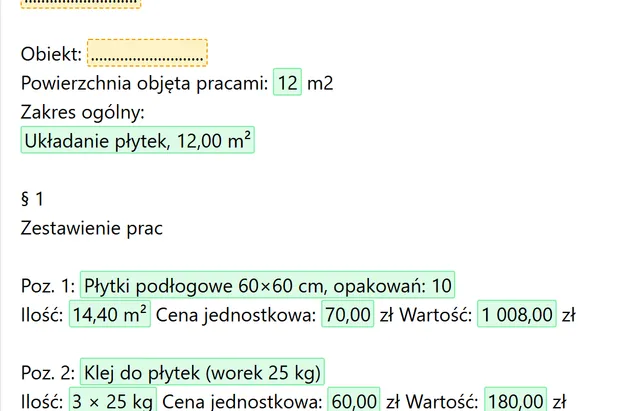
From a free calculator to an estimate
One click turns the paint or tiles calculator result into an estimate in the document generator.
Open


In preparation
Not there yet. This is how it is meant to look, so you know where this is going.
- Visualization—in preparation
Price updates through the Chrome extension
Refresh the price of a product added from a shop right from the project.
- Visualization—in preparation
Large estimates in the generator
All your pricing, with every item, will go into the estimate, not just the category totals.
Five tools, one renovation
Each one works on its own. Together they pass data along so you never retype it.
Room planner
Floor plan with room areas, 3D view
Chrome extension
Products from shop pages: what the shop gives
Renovation Calculator AI
Labor and materials priced from the client's description
Document generator
Contract, estimate, online signature, QR code
Free calculators
Paint, tiles, wall colors
- Chrome extension : Renovation Calculator AIa shop product goes into the projectWorks today
- Renovation Calculator AI : Document generatorcontract and estimate with project dataWorks today
- Free calculators : Document generatorpaint or tiles result as an estimateWorks today
- Renovation Calculator AI : Room planneropen the planner from the project menuWorks today
- Room planner : Renovation Calculator AIrooms with floor area and perimeterWorks today
- Room planner : Renovation Calculator AIinstallations from the plan into the estimateIn preparation
- Renovation Calculator AI : Chrome extensionproduct price refreshIn preparation
The full estimate
Every category and amount, with no hidden items.
Estimate settings
Scope of the estimate, details the client sees, and the PDF template.
Project sharing
Access for a chosen person: read, edit or admin. The public read-only link is for companies.
Duplicate projects
Copy a project and choose what comes along: quantities, photos, notes.
Margin, discount and VATfor companies
Set separately for furnishings, materials and labor—or on a single item when you want an exception.
Your own formulasfor companies
Change how an item is calculated, e.g. the amount of material per meter.
Company page in the directoryfor companies
Your company profile in this site's company directory, with projects and reviews.
Questions about quoting cleaning
How is the price of post-renovation cleaning worked out?
Per m² of floor, separately for an apartment after renovation and a house after construction. Windows, film on the frames, panes to scrape and adhesive residue are separate items.
Why is the VAT 23% and not 8%?
Cleaning is not construction work. This service has no reduced rate, so the calculator uses 23% in a private apartment too.
Does the calculator include waste removal?
Yes. Removal in a bulk bag (approx. 1 m³) with pickup is an item per unit: bags, boxes and leftovers from the renovation.
Is window cleaning included in the per-m² cleaning price?
No. A window with its frame and sill is counted per window, and a balcony door counts as one window.
How is cleaning the site after construction worked out?
Per m² of the area around the house: leftover materials, film and small debris.
Join Our User Community
Have questions? Join our community of renovation calculator users and share your experiences.
